Made better, one batch at a time

What is new at WiFi.ee

Follow the evolution from the first WiFi.ee website in March 2002 to today. The early chapters come from contemporary archives, then Git takes over for the modern platform.

Updated

27 named chapters · 20022026

Latest

Fresher place data, without risky overwrites

Eve Checks In

Our new business-freshness agent can investigate whether a place is still open and collect useful clues. Its findings stay in a separate, reversible review layer until a human decides what belongs in the main database.

  • Eve can research business freshness and report what it found.
  • AI observations never silently replace human-maintained data.
  • Wi-Fi availability can now be marked as yes, no, or not known yet.
WebsiteWeb admin

Wi-Fi no longer has to stay put

Near, Far, and Moving

Trains, ferries, and other moving places can finally live in the database without pretending to have one fixed pin. The mobile explorer also opens with nearby results, so the useful stuff is right there.

  • Moving Wi-Fi areas support routes and transport context.
  • Speed observations can keep the location where they were measured.
  • Nearby is now the default, with country tabs removed from the mobile explorer.
WebsiteWeb adminMobile appMobile admin

More context, fewer upload headaches

The Big Photo Roll

Wi-Fi areas can tell their story with real galleries now. Adding photos feels like one continuous flow, iPhone formats behave, and cover images make admin lists much easier to scan.

  • Area pages show responsive galleries when several photos are available.
  • Recent and nearby photos now appear in one picker.
  • HEIC uploads and cover-photo handling are more reliable.
WebsiteMobile appMobile admin

More ways to find a connection

Wi-Fi in Your Pocket

Nearby Wi-Fi is escaping the browser. It can surface through widgets, Siri, an App Clip, Wear OS, Telegram, and even an offline-friendly finder when reception gets weird.

  • A nearest-areas service now powers widgets, Siri, and quick actions.
  • New App Clip and Wear OS companions make joining quicker.
  • Telegram and offline support offer useful fallbacks on the move.
WebsiteMobile appWatch

Smarter search, measurements, and place feel

Better Signals

Search got more relevant, distance queries got faster, and speed-test screenshots can turn into useful measurements. You can also describe how a place feels and save that rating for later.

  • AI reads speed-test screenshots instead of asking you to type every number.
  • PostGIS makes nearby searches faster and more precise.
  • Search relevance, place-personality ratings, and Wi-Fi standard selection all improved.
WebsiteMobile app

Public, private, and finally represented properly

One Place, Many Networks

A Wi-Fi area can now contain several network names, each with its own public or private visibility. Mobile editing, joining, and imported speed tests all understand the richer model.

  • Store several SSIDs for one place.
  • Keep staff or private networks out of public views.
  • Import speed-test results from iOS Photos and Files.
WebsiteMobile appMobile admin

Less friction between you and the connection

Smoother Every Day

The everyday bits got calmer: clearer permission setup, reliable connected-network status, restored list position after opening a place, faster admin loading, and an AI helper for Wi-Fi questions.

  • Ask WiFi AI a question in Estonian or English.
  • Connected-network status and back navigation are steadier.
  • Mobile admin loads useful summaries first and explains permission states better.
WebsiteMobile appMobile admin

A friendlier welcome screen for guests

Wi-Fi for Cafés

The café experience got a proper showcase, with clearer captive-portal examples, more human Estonian copy, and admin previews that help operators understand what guests will see.

  • Modern captive-portal previews explain the guest journey.
  • Operators can see the admin experience before signing up.
  • Estonian copy and calls to action feel more natural.
WebsiteWeb admin

A cleaner welcome from wall to screen

Poster Perfect

Printable Wi-Fi cards got a proper visual system: clearer type, the WiFi.ee mark, simpler PDFs, and fewer distracting admin details. Small print, big difference.

  • Inter typography made printed cards easier to scan.
  • The WiFi.ee logo and footer gave every poster a consistent identity.
  • Simpler admin tabs kept setup focused on the useful bits.
WebsiteWeb admin

Scan, join, done

Quick Login Takes the Stage

WiFi.ee Quick Login became a real cross-platform experience, with QR cards for places, setup tools for operators, App Clip handoffs, and a desktop-friendly app layout.

  • Area pages could offer a one-scan join card.
  • Operators could configure QR and App Clip login from admin.
  • The app expanded to adaptive tablet and Electron layouts.
WebsiteWeb adminMobile app

The platform grows beyond individual hotspots

People, Chains, and App Clips

WiFi.ee began connecting the people and operators behind places. The community moved toward a forum, chains became manageable entities, quality ratings gained depth, and the first App Clip target took shape.

  • Area pages started inviting people into the forum.
  • Operators gained logo upload and Directus-backed chain editing.
  • The mobile app gained richer quality ratings and its first App Clip target.
WebsiteWeb adminMobile app

From a web experience to something in your hand

The Native Leap

The mobile app crossed into native territory with iOS project work, map and list refinements, crash reporting, internationalization groundwork, and the early push to fit joining Wi-Fi into a tiny App Clip.

  • A native iOS project established the path to App Store distribution.
  • Sentry made mobile failures visible instead of mysterious.
  • The first App Clip experiments chased a join flow under 10 MB.
Mobile appWeb admin

The operator tools find their structure

Chains, Tags, and Roles

The admin side grew from editing single places into managing a real network. Chains became searchable and editable, tags made areas easier to organize, permissions became visible, and captive-portal assets found a stable home.

  • Chains connected related Wi-Fi areas into one manageable group.
  • Tags, roles, and permission details made larger operations practical.
  • Static poster assets and smoother mobile transitions polished the edges.
WebsiteWeb adminMobile app

A workspace for the people running Wi-Fi

The Dashboard Gets Serious

WiFi.ee gained a dedicated operator dashboard with ownership-aware area lists, redesigned editing, login, and advanced settings. At the same time, the mobile app learned dark mode and multiple languages.

  • A dedicated dashboard brought operator work into one place.
  • Area lists and editing began respecting ownership and permissions.
  • Dark mode and internationalization made the mobile app more adaptable.
WebsiteWeb adminMobile app

The database opens up to its community

Suggestions Welcome

People could finally suggest missing Wi-Fi areas from the app, even while offline. A guided form, address autocomplete, photo handling, drafts, and a satisfying success moment turned contribution into a real flow.

  • Anonymous suggestions lowered the barrier to improving the map.
  • Offline queuing kept contributions safe until a connection returned.
  • Privacy and account-deletion pages made the growing product more responsible.
WebsiteMobile app

WiFi.ee returns with a modern foundation

The Great Rebuild

After years of quieter maintenance, WiFi.ee was rebuilt around Next.js, Supabase, Directus, and a modern mobile stack. Instant map search, offline SQLite data, quality scores, bookmarks, and PWA support transformed it from an old directory into a platform again.

  • The website moved from its legacy stack to Next.js and Supabase.
  • Instant Google Maps search brought the database back to life.
  • Offline data, quality ranking, and bookmarks made the mobile experience useful anywhere.
WebsiteMobile app

A small signal that the project was still alive

Posters Return

After a long quiet stretch in the public history, WiFi.ee resurfaced with refreshed posters and a tidier project structure. Not a grand relaunch yet, but the signal was back.

  • Public Wi-Fi posters were refreshed.
  • Project files and dependencies were reorganized.
  • The update bridged the original era and the later rebuild.
Website

Keeping the early service standing

Quiet Maintenance Mode

The visible history became sparse, but the original Meteor application kept receiving maintenance. Framework and dependency updates continued, while an early API experiment was retired.

  • Meteor stayed current enough to keep the service running.
  • Dependency maintenance continued through 2017 and 2018.
  • The first public API was removed as the product direction paused.
Website

Wi-Fi areas become places you can explore

The First Map

The newborn directory quickly gained the pieces that made it feel like WiFi.ee: a Google Map, a masonry-style area view, a public API, a clearer explanation of why the project existed, and its first schema refinements.

  • A Google Map made hotspots spatial and explorable.
  • The first API opened the data beyond the website.
  • A Why page gave the young project a public purpose.
Website

Version 0.1 and the first public signal

Hello, WiFi.ee

WiFi.ee began on 25 August 2016 as a simple public directory of Wi-Fi areas. One commit, one starting point, and the seed of the platform that followed.

  • The first public version established the WiFi.ee name.
  • The original product focused on finding public Wi-Fi areas.
  • Every later app, map, admin tool, and agent traces back here.
Website
Archive research

The signal becomes part of Estonia's identity

The Wi-Fi Country

By 2012, international coverage described free Wi-Fi as normal across Estonian islands, villages, cities, supermarkets, buses, and petrol stations. What began as a public map had helped make an entire country famous for finding a signal almost anywhere.

  • Free Wi-Fi was normal far beyond the largest cities.
  • Buses, supermarkets, and petrol stations carried the signal.
  • WiFi.ee helped turn public access into a national reputation.
Website
Archive research

Public Wi-Fi becomes an Estonian calling card

A Country Covered

A 2010 profile described WiFi.ee as a community effort built around internet access as a shared right. By 2011, Estonia had more than 2,440 free, certified public Wi-Fi areas in everyday places from cafes and schools to hospitals and petrol stations.

  • WiFi.ee was recognized internationally as a community movement.
  • More than 2,440 free certified areas served the public by 2011.
  • A public signal had become part of ordinary Estonian life.
Website
Archive research

A shared signal reaches across Estonia

The 1,200-Point Map

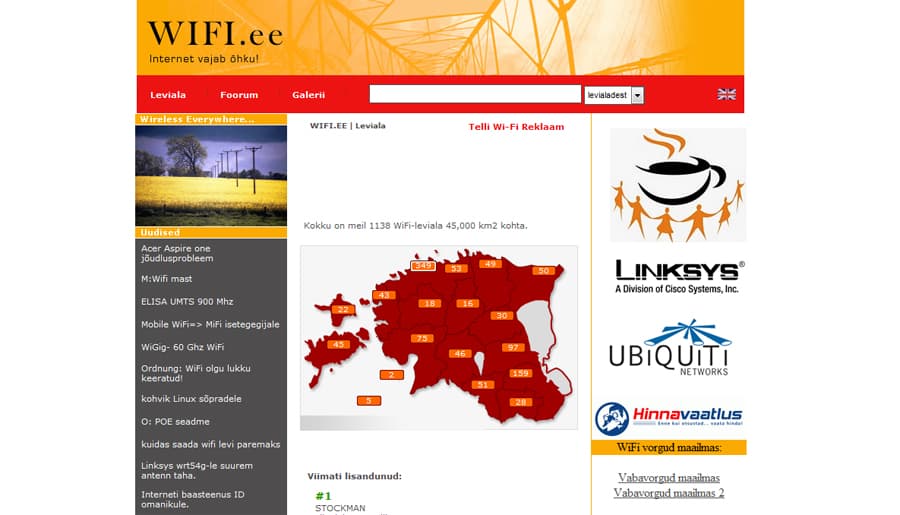
The certified hotspot count reached about 1,200 in 2008 after adding roughly 300 areas that year. The next ambition was 2,000, while WiFi.ee kept arguing that free local access worked best as part of the place around it.

WiFi.ee homepage circa 2008, with a map of Estonia showing hotspot counts by county
The original WiFi.ee homepage, circa 2008. Its map counted 1,138 Wi-Fi areas across 45,000 km².
  • Nearly 1,200 public areas were listed by July 2008.
  • The network had added around 300 locations that year.
  • The public goal was 2,000 hotspots by 2009.
Website
Archive research

From city streets to moving trains

Wi-Fi Finds Its Wheels

By June 2006, WiFi.ee tracked 812 public Wi-Fi areas, including 310 in Tallinn. The archive soon followed wireless internet onto Estonian trains and into a new generation of pocket-sized devices.

  • The directory grew by 132 public areas in six months.
  • Tallinn alone accounted for 310 listed hotspots.
  • Public Wi-Fi began following people onto trains.
Website
Archive research

The directory becomes a national utility

The 500 Club

The checked public Wi-Fi directory passed 500 locations in 2005. About 300 were free, people could look them up over WAP, and cafes and local governments helped add around 250 new areas during the year.

  • 505 registered and checked public Wi-Fi areas by May.
  • A mobile WAP lookup helped people find a signal on the move.
  • Free access grew through cafes and local government projects.
Website
Archive research

Public Wi-Fi becomes civic infrastructure

A City-Sized Hotspot

By 2004, outside observers counted more than 280 Estonian access points, roughly two thirds of them free. Tartu was also planning a city-supported network of central cafes, public terminals, and local online services.

  • More than 280 access points made the movement visible nationwide.
  • Most listed access points were already free to use.
  • Tartu imagined Wi-Fi as a home for local civic media and conversation.
Website
Archive research

The movement before the map

The Signal Goes Public

WiFi.ee went online in March 2002 with a simple, generous idea: internet access should be easy to find and free in public places. About ten public internet zones appeared in the first month, followed by hundreds within a few more months.

  • The WiFi.ee website launched in March 2002.
  • The first month brought about ten public internet zones.
  • Cafes, hotels, parks, and petrol stations joined the movement.
Website